

Why optimize
When you press to talk you test the paths you think of. Real callers do things you did not script - they hesitate, change their mind, answer the wrong question. Optimize generates a spread of simulated callers, runs the conversation against each, scores how often the agent reached its goal, and rewrites the weak checkpoints to fix what failed.Optimize is powered by the builder engine’s
generate_personas,
simulate_and_score, and optimize_playbook tools. They are consent-gated -
the agent proposes a run and you accept it; it never silently rewrites your work.How to run it
1
Trigger it
Use the Optimize action in the composer toolbar. The builder agent may
also propose a run itself once your playbook looks functionally complete.
2
Watch the in-chat card
An Optimize run card renders right in the chat thread with a live round
indicator (
round 2/3 ●●○) and a goal score that animates up as rounds
complete - e.g. 62% → 81%.3
Review and apply
On finish, the hardened YAML lands in the Editor tab (“Applied to editor”).
Re-open Preview and re-test.
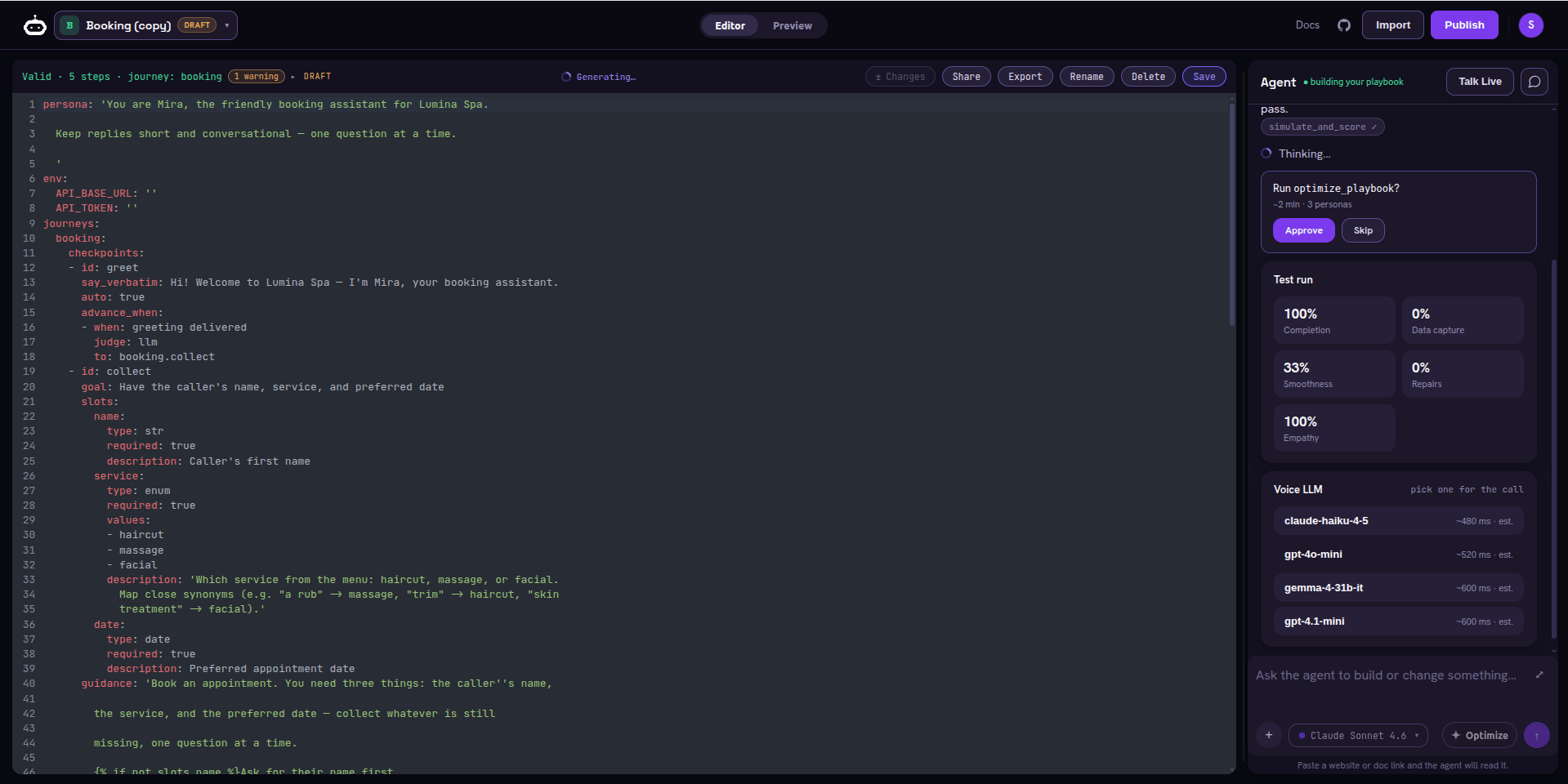
The Optimize run - a consent-gated 'Run optimize_playbook?' prompt, the live Test-run scorecard (completion, data capture, smoothness, repairs, empathy), and the Voice LLM picker for the call
Reading the card
The card has aDetails | Preview toggle:
Details
The round-by-round trace and the top failures in plain language - “the
agent skipped the callback-number checkpoint when the caller was in a hurry.”
Preview
The metric readout for the run (below), so you can see the score behind the
animation.
What gets measured
The scorecard shows the engine’s four deterministic metrics - computed from the transcript without any LLM call - plus one LLM-judged score:
Latency is not scored by the optimizer - the per-model estimates in the Voice
LLM picker come from real test calls.
Coverage and knowledge-base-hit metrics on this card are later milestones.
Guardrail scoring exists today in the
SuperDialog eval harness, where it is a hard gate. The
numbers you see here are real engine output, not estimates.
Two ways it hardens the playbook
Auto (multi-round)
optimize_playbook runs several rounds, each time regenerating personas,
re-scoring, and rewriting the checkpoints that failed. The score climbs
across rounds until it plateaus.Manual (propose / accept)
The agent proposes prose edits in normal chat - “I’d tighten the refund
checkpoint like this” - and you accept or reject each one.
When to stop
Stop when the goal-completion score plateaus and the top-failures list is empty or down to edge cases you are comfortable with. Do a final Press to talk pass in Preview to hear the hardened version, then ship it.Next step
Publish & share
Set visibility, share the agent by link, clone it, and generate an API key to
take it live on a number.