> ## Documentation Index
> Fetch the complete documentation index at: https://docs.unpod.ai/llms.txt
> Use this file to discover all available pages before exploring further.
# Daily (Dashboard)
> Connect Daily to Unpod with no code - create a SIP trunk on your Unpod number and point it at your Daily SIP dial-in room.
The **no-code** path. Create a SIP trunk on your Unpod number, point it at your **Daily
SIP dial-in** address, then copy the trunk's origin-endpoint credentials so Daily can reach
Unpod. One trunk carries inbound and outbound. Prefer code? See the
[API guide](/telephony/integrations/daily/api).
**You need:** an Unpod number on a Bridge, and a Daily account with **SIP dial-in enabled**
on a room (this gives you a `sip:...@.sip.daily.co` address).
We only show the **Unpod-side** screens here. Treat your SIP trunk username/password as
secrets - never paste them into shared docs or screenshots.
## Part 1 - Create the trunk in Unpod
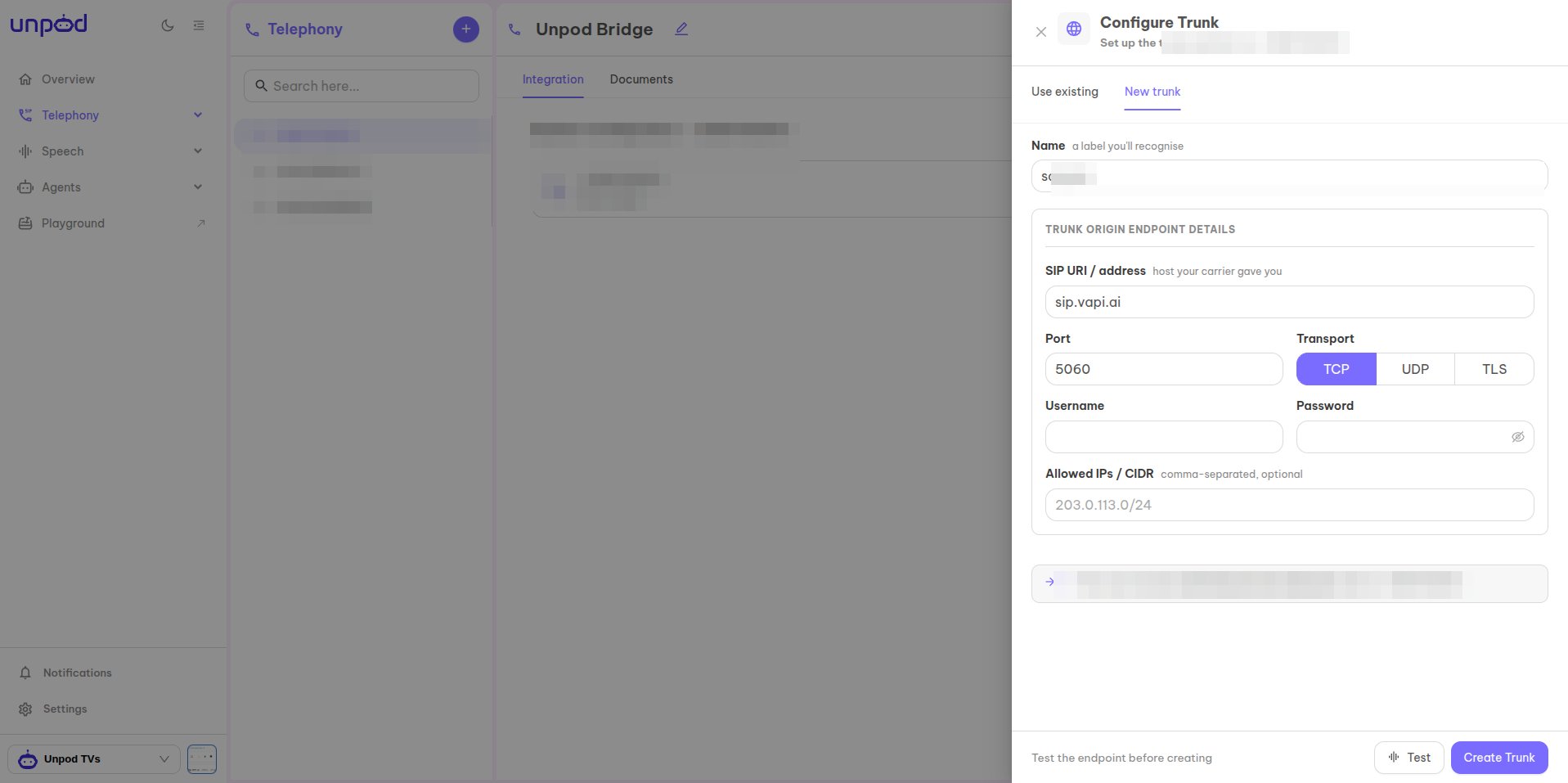
In **Telephony**, select your number and click **Configure**. On the **New trunk** tab,
set a **Name** you'll recognise and the **trunk origin endpoint**:
* **SIP URI / address** - your **Daily SIP dial-in** address
(e.g. `sip:endpoint@your-subdomain.sip.daily.co`).
* **Port** `5060` and **Transport** (`TCP` / `UDP` / `TLS`).
* **Allowed IPs / CIDR** - optional source allow-list.
Click **Test** to validate, then **Create Trunk**.
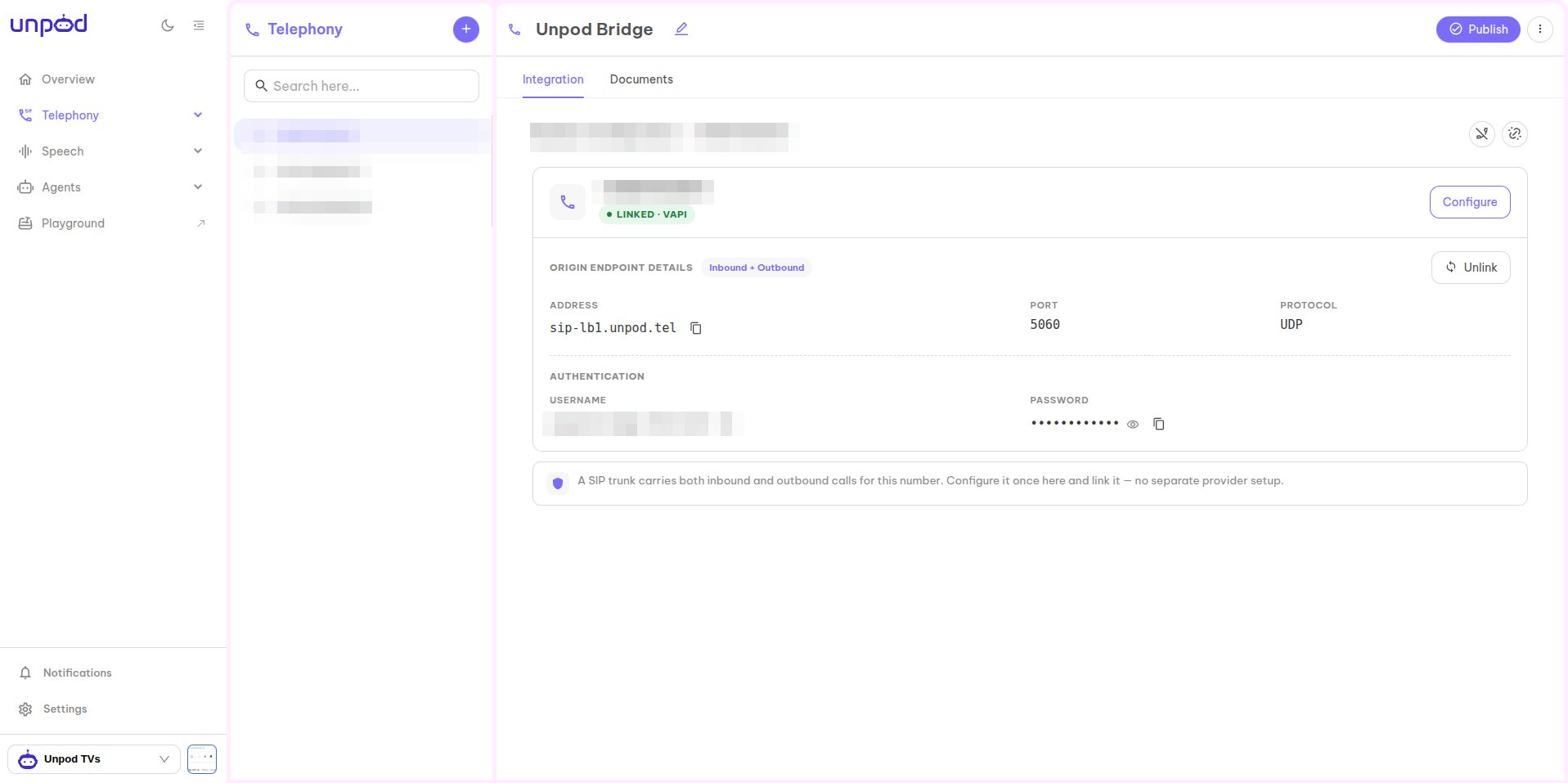
 The number now shows **Linked · Daily**. Under **Origin Endpoint Details** copy the
values - Daily uses them to reach Unpod:
* **Address** - e.g. `sip-lb1.unpod.tel`
* **Port** / **Protocol** - `5060` / `UDP`
* **Username** and **Password** (under **Authentication**)
The number now shows **Linked · Daily**. Under **Origin Endpoint Details** copy the
values - Daily uses them to reach Unpod:
* **Address** - e.g. `sip-lb1.unpod.tel`
* **Port** / **Protocol** - `5060` / `UDP`
* **Username** and **Password** (under **Authentication**)
 ## Part 2 - Enable SIP dial-in on Daily
Daily has **no fixed SIP host** - each room exposes its own SIP address. Enable SIP dial-in
so Daily gives you the `sip_uri` you entered in Part 1.
Enable SIP dial-in on the Daily room (set the room's `sip` property with
`sip_mode: "dial-in"`). Daily returns a read-only **`sip_uri`** in the form
`sip:@.sip.daily.co`. This is **API-only** - Daily has no
dashboard screen for it.
Point that room / SIP dial-in at the agent that should answer, so incoming calls from
the Unpod trunk connect to it.
Daily's SIP dial-in setup is **API-driven** (room `sip` property / `pinless_dialin`). See
[Daily's SIP dial-in docs](https://docs.daily.co/guides/products/dial-in-dial-out/sip).
## Part 3 - Publish
Back in the Unpod Studio, click **Publish** to activate the configuration. The number is
then ready for inbound and outbound calls.
## Troubleshooting
| Symptom | Likely cause | Fix |
| ----------------------------- | ------------------------------------- | -------------------------------------------------------------------------- |
| Trunk **Test** fails in Unpod | Wrong Daily `sip_uri` or transport | Re-copy the room's `sip_uri`; match transport |
| Daily can't reach the trunk | Wrong origin-endpoint address or auth | Re-copy **Address** + **Username/Password** from the Unpod origin endpoint |
| Call connects, agent silent | No agent bound to the room | Route the SIP dial-in room to an agent |
| Inbound not arriving | SIP dial-in not enabled | Set `sip_mode: "dial-in"` on the Daily room |
| Number not reachable | Config not published | Click **Publish** in the Unpod Studio |
Same flow over the REST API.
Back to the integrations overview.
## Part 2 - Enable SIP dial-in on Daily
Daily has **no fixed SIP host** - each room exposes its own SIP address. Enable SIP dial-in
so Daily gives you the `sip_uri` you entered in Part 1.
Enable SIP dial-in on the Daily room (set the room's `sip` property with
`sip_mode: "dial-in"`). Daily returns a read-only **`sip_uri`** in the form
`sip:@.sip.daily.co`. This is **API-only** - Daily has no
dashboard screen for it.
Point that room / SIP dial-in at the agent that should answer, so incoming calls from
the Unpod trunk connect to it.
Daily's SIP dial-in setup is **API-driven** (room `sip` property / `pinless_dialin`). See
[Daily's SIP dial-in docs](https://docs.daily.co/guides/products/dial-in-dial-out/sip).
## Part 3 - Publish
Back in the Unpod Studio, click **Publish** to activate the configuration. The number is
then ready for inbound and outbound calls.
## Troubleshooting
| Symptom | Likely cause | Fix |
| ----------------------------- | ------------------------------------- | -------------------------------------------------------------------------- |
| Trunk **Test** fails in Unpod | Wrong Daily `sip_uri` or transport | Re-copy the room's `sip_uri`; match transport |
| Daily can't reach the trunk | Wrong origin-endpoint address or auth | Re-copy **Address** + **Username/Password** from the Unpod origin endpoint |
| Call connects, agent silent | No agent bound to the room | Route the SIP dial-in room to an agent |
| Inbound not arriving | SIP dial-in not enabled | Set `sip_mode: "dial-in"` on the Daily room |
| Number not reachable | Config not published | Click **Publish** in the Unpod Studio |
Same flow over the REST API.
Back to the integrations overview.