> ## Documentation Index
> Fetch the complete documentation index at: https://docs.unpod.ai/llms.txt
> Use this file to discover all available pages before exploring further.
# Speech Pipe
> Create, configure, and manage Speech Pipes via the Unpod SDK.
## What Is a Speech Pipe?
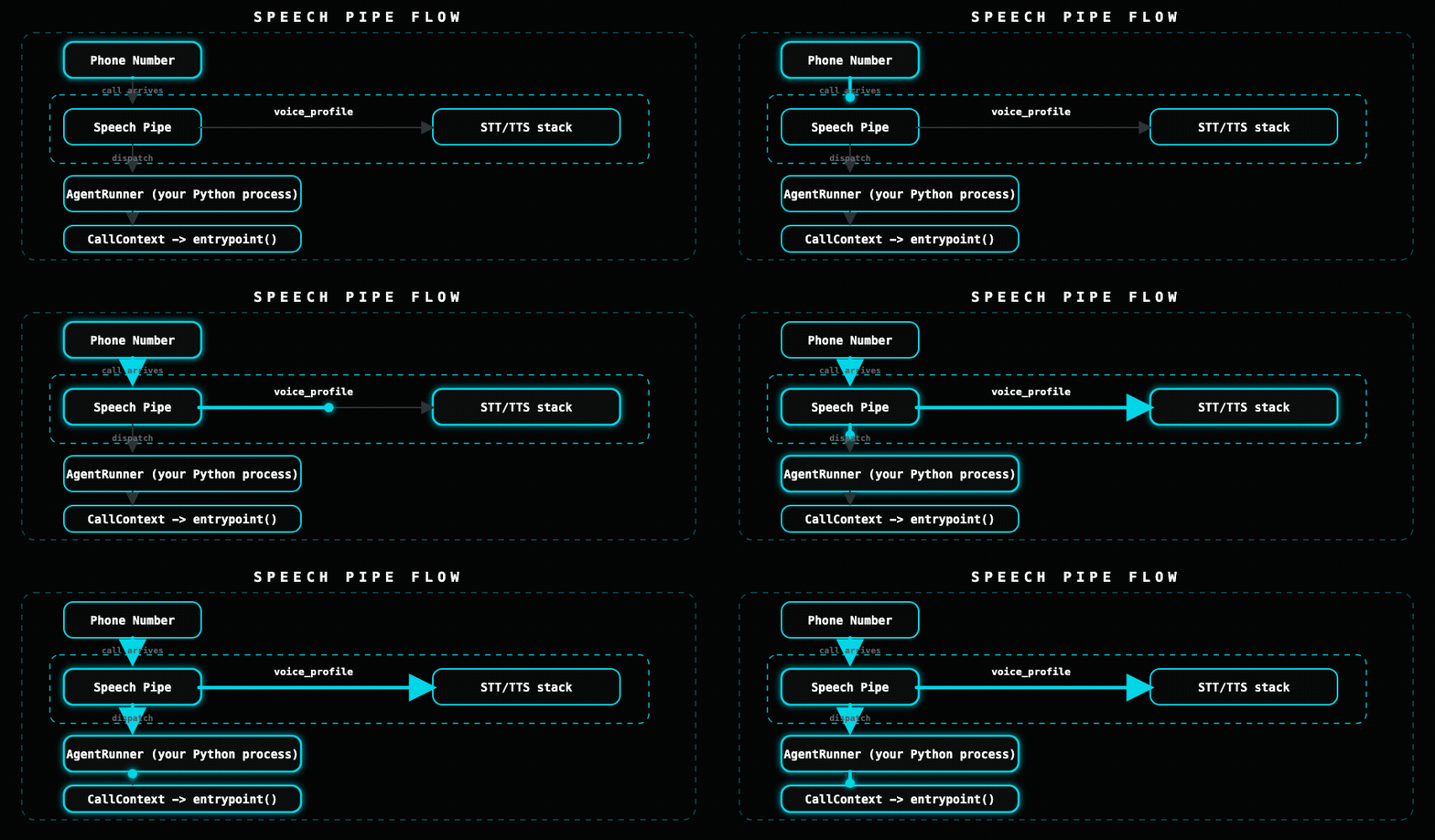
A **[Speech Pipe](/get-started/core-concepts#pipe)** in Unpod ties together a voice profile (STT + TTS), telephony (phone numbers), and a pointer to your agent brain into a single deployable unit. When a call arrives on a number attached to the pipe, the orchestrator dispatches it to your `AgentRunner` process.
 ***
## Creating a Pipe
```python theme={null}
import asyncio
from unpod import AsyncClient
async def main():
async with AsyncClient(api_key="sk_...") as client:
pipe = await client.pipes.create(
name="Support Bot",
voice_profile="vp_en_female_hd", # from voice_profiles.list()
agent_id="my-bot", # links to your AgentRunner
recording=True, # store call recordings
max_call_duration_s=600, # 10-minute hard cap
)
print("Created:", pipe.pipe_id, pipe.name)
asyncio.run(main())
```
### `create()` parameters
| Parameter | Type | Default | Description |
| --------------------- | ------------- | -------- | ---------------------------------------------------------------------------------------------------------------------------------------------------- |
| `name` | `str` | required | Display name for the pipe |
| `voice_profile` | `str \| None` | `None` | Voice profile ID (`vp_...`) |
| `agent_id` | `str \| None` | `None` | ID of your `AgentRunner` brain - links the pipe to your runner worker (preferred) |
| `agent_endpoint` | `str \| None` | `None` | Static **WebSocket** URL (`wss://...`) of your `AgentRunner` bridge - a fallback used when no runner has registered for `agent_id`. Not an HTTP URL. |
| `recording` | `bool` | `False` | Enable call recording |
| `max_call_duration_s` | `int` | `3600` | Hard cap in seconds (default 1 hour) |
***
## Listing Pipes
```python theme={null}
import asyncio
from unpod import AsyncClient
async def main():
async with AsyncClient(api_key="sk_...") as client:
pipes = await client.pipes.list()
for p in pipes:
print(p.pipe_id, p.name, p.voice_profile_id or "no voice profile")
asyncio.run(main())
```
### Pipe fields
| Field | Type | Description |
| --------------------- | ------------- | -------------------------------------------------------------------------- |
| `pipe_id` | `str` | Speech Pipe ID (`pipe_...`) |
| `name` | `str` | Display name |
| `voice_profile_id` | `str \| None` | Voice profile ID |
| `agent_id` | `str \| None` | Your `AgentRunner` brain ID |
| `agent_endpoint` | `str \| None` | Static `wss://` URL of your `AgentRunner` bridge (fallback for `agent_id`) |
| `recording` | `bool` | Recording enabled |
| `max_call_duration_s` | `int` | Call duration hard cap |
| `created` | `datetime` | Creation timestamp |
| `modified` | `datetime` | Last modified timestamp |
***
## Getting a Single Pipe
```python theme={null}
import asyncio
from unpod import AsyncClient
async def main():
async with AsyncClient(api_key="sk_...") as client:
pipe = await client.pipes.get("pipe_...")
print(pipe.name, pipe.voice_profile_id, pipe.recording)
asyncio.run(main())
```
***
## Updating a Pipe
```python theme={null}
import asyncio
from unpod import AsyncClient
async def main():
async with AsyncClient(api_key="sk_...") as client:
# Update any subset of fields
pipe = await client.pipes.update(
"pipe_...",
name="Premium Support Bot",
voice_profile="vp_en_female_hd",
recording=True,
max_call_duration_s=1200,
)
print("Updated:", pipe.pipe_id, pipe.name)
asyncio.run(main())
```
***
## Deleting a Pipe
Deleting a pipe does **not** automatically detach phone numbers. Detach all numbers before deleting to avoid orphaned routing.
```python theme={null}
import asyncio
from unpod import AsyncClient
async def main():
async with AsyncClient(api_key="sk_...") as client:
# Detach numbers first
numbers = await client.numbers.list()
for n in numbers:
if n.pipe_id == "pipe_...":
await client.numbers.detach(n.number_id)
# Then delete
await client.pipes.delete("pipe_...")
print("Deleted")
asyncio.run(main())
```
***
## How the Pipe Reaches Your Brain
The pipe never calls your brain over HTTP. On every call the orchestrator dispatches the session to a **worker**, and the worker connects to your `AgentRunner` over a **WebSocket bridge** (text in / text out). There are two ways the pipe finds that runner:
1. **By `agent_id` (preferred).** Run an `AgentRunner` with the same `agent_id` as the pipe. It self-registers its bridge `serving_url`; the orchestrator picks a registered, least-loaded runner per call. You never hardcode a URL.
2. **By `agent_endpoint` (static fallback).** Set the pipe's `agent_endpoint` to a fixed `wss://...` bridge URL. Used only when no runner is registered for `agent_id`. This is a **WebSocket** URL, not an HTTP endpoint.
`agent_endpoint` is **not** an HTTP webhook - the orchestrator does not `POST` to it. It is the WebSocket bridge URL your `AgentRunner` serves on.
## Bridging a Remote HTTP Brain
If you already have a chatbot or API (any language) and want to voice-enable it, run an `AgentRunner` and set its dialog brain to an `HTTPAdapter`. The adapter `POST`s each user turn to your endpoint from inside the runner:
```python theme={null}
from unpod import AgentRunner, CallContext
from unpod.adapters.http import HTTPAdapter
async def handle_call(ctx: CallContext) -> None:
ctx.session.dialog_machine = HTTPAdapter(
url="https://your-api.example.com/dialog/turn",
)
await ctx.session.run()
AgentRunner(entrypoint=handle_call, agent_id="my-bot").start()
```
### HTTPAdapter Protocol
The `HTTPAdapter` sends a `POST` on every user turn:
```
POST https://your-api.example.com/dialog/turn
Content-Type: application/json
{
"text": "I'd like to reschedule my appointment",
"context": { ... },
"session_id": "sess_xyz789",
"system_instructions": ["..."] // present only after assist() is called
}
```
Your endpoint must respond with:
```json theme={null}
{
"text": "Sure, I can help with that. What date works for you?"
}
```
This protocol is **not** OpenAI-compatible. It is a simple text-in / text-out interface - your endpoint owns all LLM or chatbot logic. Forward to OpenAI, Gemini, a rules engine, or anything else under the hood. See [Adapters](/speech-stack/adapters) for the full `HTTPAdapter` contract (streaming, `assist()`, error surfaces).
***
## Pipe + Runner Pattern (Recommended)
The recommended pattern for production is a dedicated `AgentRunner` process:
```python theme={null}
from unpod import AgentRunner, CallContext
AGENT_ID = "my-bot" # must match the pipe's agent_id
async def handle_call(ctx: CallContext) -> None:
await ctx.session.say("Hello, how can I help you?")
await ctx.session.run()
runner = AgentRunner(
entrypoint=handle_call,
agent_id=AGENT_ID,
max_sessions=20,
)
runner.start()
```
The `agent_id` in `AgentRunner` must match the pipe's `agent_id` in the platform. The orchestrator uses it to route dispatches to the correct runner worker.
***
## Next Steps
Install and configure the AgentRunner for production.
Say, transfer, end, and record during live calls.
***
## Creating a Pipe
```python theme={null}
import asyncio
from unpod import AsyncClient
async def main():
async with AsyncClient(api_key="sk_...") as client:
pipe = await client.pipes.create(
name="Support Bot",
voice_profile="vp_en_female_hd", # from voice_profiles.list()
agent_id="my-bot", # links to your AgentRunner
recording=True, # store call recordings
max_call_duration_s=600, # 10-minute hard cap
)
print("Created:", pipe.pipe_id, pipe.name)
asyncio.run(main())
```
### `create()` parameters
| Parameter | Type | Default | Description |
| --------------------- | ------------- | -------- | ---------------------------------------------------------------------------------------------------------------------------------------------------- |
| `name` | `str` | required | Display name for the pipe |
| `voice_profile` | `str \| None` | `None` | Voice profile ID (`vp_...`) |
| `agent_id` | `str \| None` | `None` | ID of your `AgentRunner` brain - links the pipe to your runner worker (preferred) |
| `agent_endpoint` | `str \| None` | `None` | Static **WebSocket** URL (`wss://...`) of your `AgentRunner` bridge - a fallback used when no runner has registered for `agent_id`. Not an HTTP URL. |
| `recording` | `bool` | `False` | Enable call recording |
| `max_call_duration_s` | `int` | `3600` | Hard cap in seconds (default 1 hour) |
***
## Listing Pipes
```python theme={null}
import asyncio
from unpod import AsyncClient
async def main():
async with AsyncClient(api_key="sk_...") as client:
pipes = await client.pipes.list()
for p in pipes:
print(p.pipe_id, p.name, p.voice_profile_id or "no voice profile")
asyncio.run(main())
```
### Pipe fields
| Field | Type | Description |
| --------------------- | ------------- | -------------------------------------------------------------------------- |
| `pipe_id` | `str` | Speech Pipe ID (`pipe_...`) |
| `name` | `str` | Display name |
| `voice_profile_id` | `str \| None` | Voice profile ID |
| `agent_id` | `str \| None` | Your `AgentRunner` brain ID |
| `agent_endpoint` | `str \| None` | Static `wss://` URL of your `AgentRunner` bridge (fallback for `agent_id`) |
| `recording` | `bool` | Recording enabled |
| `max_call_duration_s` | `int` | Call duration hard cap |
| `created` | `datetime` | Creation timestamp |
| `modified` | `datetime` | Last modified timestamp |
***
## Getting a Single Pipe
```python theme={null}
import asyncio
from unpod import AsyncClient
async def main():
async with AsyncClient(api_key="sk_...") as client:
pipe = await client.pipes.get("pipe_...")
print(pipe.name, pipe.voice_profile_id, pipe.recording)
asyncio.run(main())
```
***
## Updating a Pipe
```python theme={null}
import asyncio
from unpod import AsyncClient
async def main():
async with AsyncClient(api_key="sk_...") as client:
# Update any subset of fields
pipe = await client.pipes.update(
"pipe_...",
name="Premium Support Bot",
voice_profile="vp_en_female_hd",
recording=True,
max_call_duration_s=1200,
)
print("Updated:", pipe.pipe_id, pipe.name)
asyncio.run(main())
```
***
## Deleting a Pipe
Deleting a pipe does **not** automatically detach phone numbers. Detach all numbers before deleting to avoid orphaned routing.
```python theme={null}
import asyncio
from unpod import AsyncClient
async def main():
async with AsyncClient(api_key="sk_...") as client:
# Detach numbers first
numbers = await client.numbers.list()
for n in numbers:
if n.pipe_id == "pipe_...":
await client.numbers.detach(n.number_id)
# Then delete
await client.pipes.delete("pipe_...")
print("Deleted")
asyncio.run(main())
```
***
## How the Pipe Reaches Your Brain
The pipe never calls your brain over HTTP. On every call the orchestrator dispatches the session to a **worker**, and the worker connects to your `AgentRunner` over a **WebSocket bridge** (text in / text out). There are two ways the pipe finds that runner:
1. **By `agent_id` (preferred).** Run an `AgentRunner` with the same `agent_id` as the pipe. It self-registers its bridge `serving_url`; the orchestrator picks a registered, least-loaded runner per call. You never hardcode a URL.
2. **By `agent_endpoint` (static fallback).** Set the pipe's `agent_endpoint` to a fixed `wss://...` bridge URL. Used only when no runner is registered for `agent_id`. This is a **WebSocket** URL, not an HTTP endpoint.
`agent_endpoint` is **not** an HTTP webhook - the orchestrator does not `POST` to it. It is the WebSocket bridge URL your `AgentRunner` serves on.
## Bridging a Remote HTTP Brain
If you already have a chatbot or API (any language) and want to voice-enable it, run an `AgentRunner` and set its dialog brain to an `HTTPAdapter`. The adapter `POST`s each user turn to your endpoint from inside the runner:
```python theme={null}
from unpod import AgentRunner, CallContext
from unpod.adapters.http import HTTPAdapter
async def handle_call(ctx: CallContext) -> None:
ctx.session.dialog_machine = HTTPAdapter(
url="https://your-api.example.com/dialog/turn",
)
await ctx.session.run()
AgentRunner(entrypoint=handle_call, agent_id="my-bot").start()
```
### HTTPAdapter Protocol
The `HTTPAdapter` sends a `POST` on every user turn:
```
POST https://your-api.example.com/dialog/turn
Content-Type: application/json
{
"text": "I'd like to reschedule my appointment",
"context": { ... },
"session_id": "sess_xyz789",
"system_instructions": ["..."] // present only after assist() is called
}
```
Your endpoint must respond with:
```json theme={null}
{
"text": "Sure, I can help with that. What date works for you?"
}
```
This protocol is **not** OpenAI-compatible. It is a simple text-in / text-out interface - your endpoint owns all LLM or chatbot logic. Forward to OpenAI, Gemini, a rules engine, or anything else under the hood. See [Adapters](/speech-stack/adapters) for the full `HTTPAdapter` contract (streaming, `assist()`, error surfaces).
***
## Pipe + Runner Pattern (Recommended)
The recommended pattern for production is a dedicated `AgentRunner` process:
```python theme={null}
from unpod import AgentRunner, CallContext
AGENT_ID = "my-bot" # must match the pipe's agent_id
async def handle_call(ctx: CallContext) -> None:
await ctx.session.say("Hello, how can I help you?")
await ctx.session.run()
runner = AgentRunner(
entrypoint=handle_call,
agent_id=AGENT_ID,
max_sessions=20,
)
runner.start()
```
The `agent_id` in `AgentRunner` must match the pipe's `agent_id` in the platform. The orchestrator uses it to route dispatches to the correct runner worker.
***
## Next Steps
Install and configure the AgentRunner for production.
Say, transfer, end, and record during live calls.