> ## Documentation Index
> Fetch the complete documentation index at: https://docs.unpod.ai/llms.txt
> Use this file to discover all available pages before exploring further.
# Public & your playbooks
> The playbook gallery has two tabs - Public (agents anyone published, browse and clone) and My Playbook (your private drafts). Open either in the Playground, test it, and make it your own.
## Two tabs, two libraries
The playbook gallery is where every agent lives. It has two tabs:
Every **public** playbook, from all users. Browse without an account, open one
in the Playground, talk to it, and **clone** it to start your own.
**Your own** private playbooks and drafts. Requires login. Open one to keep
editing, testing, or publishing it.
Only playbooks published as **Public** appear in the Public tab. Ones you keep
**Private** or **Unlisted** never show up there - see
[visibility levels](/playbook/publish-and-share#step-1-publish-and-set-visibility).
## Public playbooks - browse and reuse
The **Public** tab lists every publicly shared agent. Use it to start from
someone else's working agent instead of a blank page.
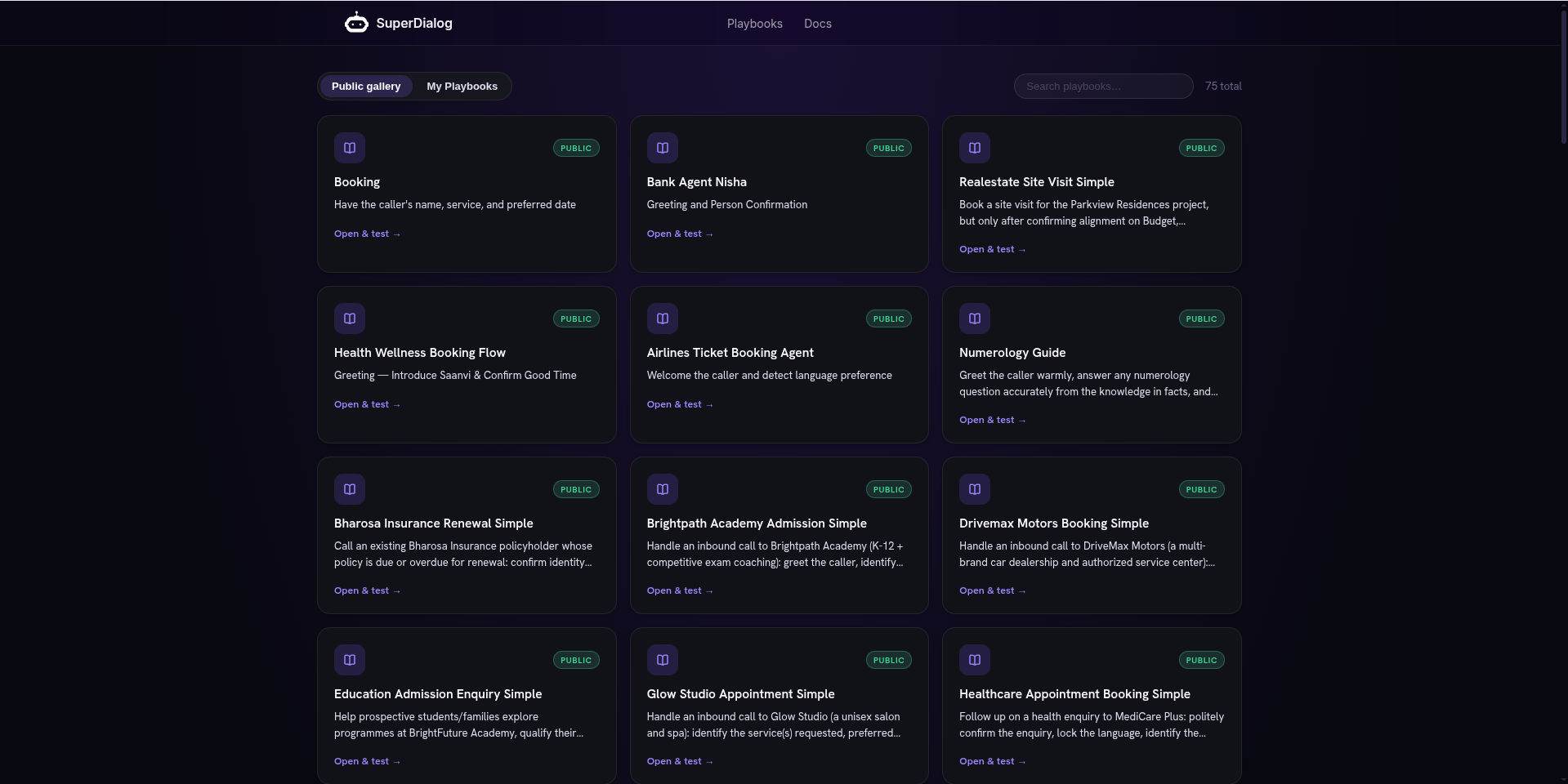 Scan the list or use the **search** box to filter by name. No account needed
just to browse.
Hit **View in Playground**. The agent loads and you can **Press to talk** and
hear it, exactly as its author built it.
Use **Clone & edit** to copy it into your own **private** playbook. Now you
can change the persona, checkpoints, and voice without touching the original.
Cloning is the fastest way to learn playbook style - open a public agent that
does something close to your use case, clone it, and reshape it in chat.
If the Public tab says *"No public playbooks available yet,"* nothing has been
published publicly in your environment yet - build one and
[publish it Public](/playbook/publish-and-share) to seed the gallery.
## My Playbook - your own agents
The **My Playbook** tab (login required) is your private library: everything you
have created or cloned. Each row shows its state - a **Draft** tag marks a
playbook you have saved but not published.
Scan the list or use the **search** box to filter by name. No account needed
just to browse.
Hit **View in Playground**. The agent loads and you can **Press to talk** and
hear it, exactly as its author built it.
Use **Clone & edit** to copy it into your own **private** playbook. Now you
can change the persona, checkpoints, and voice without touching the original.
Cloning is the fastest way to learn playbook style - open a public agent that
does something close to your use case, clone it, and reshape it in chat.
If the Public tab says *"No public playbooks available yet,"* nothing has been
published publicly in your environment yet - build one and
[publish it Public](/playbook/publish-and-share) to seed the gallery.
## My Playbook - your own agents
The **My Playbook** tab (login required) is your private library: everything you
have created or cloned. Each row shows its state - a **Draft** tag marks a
playbook you have saved but not published.
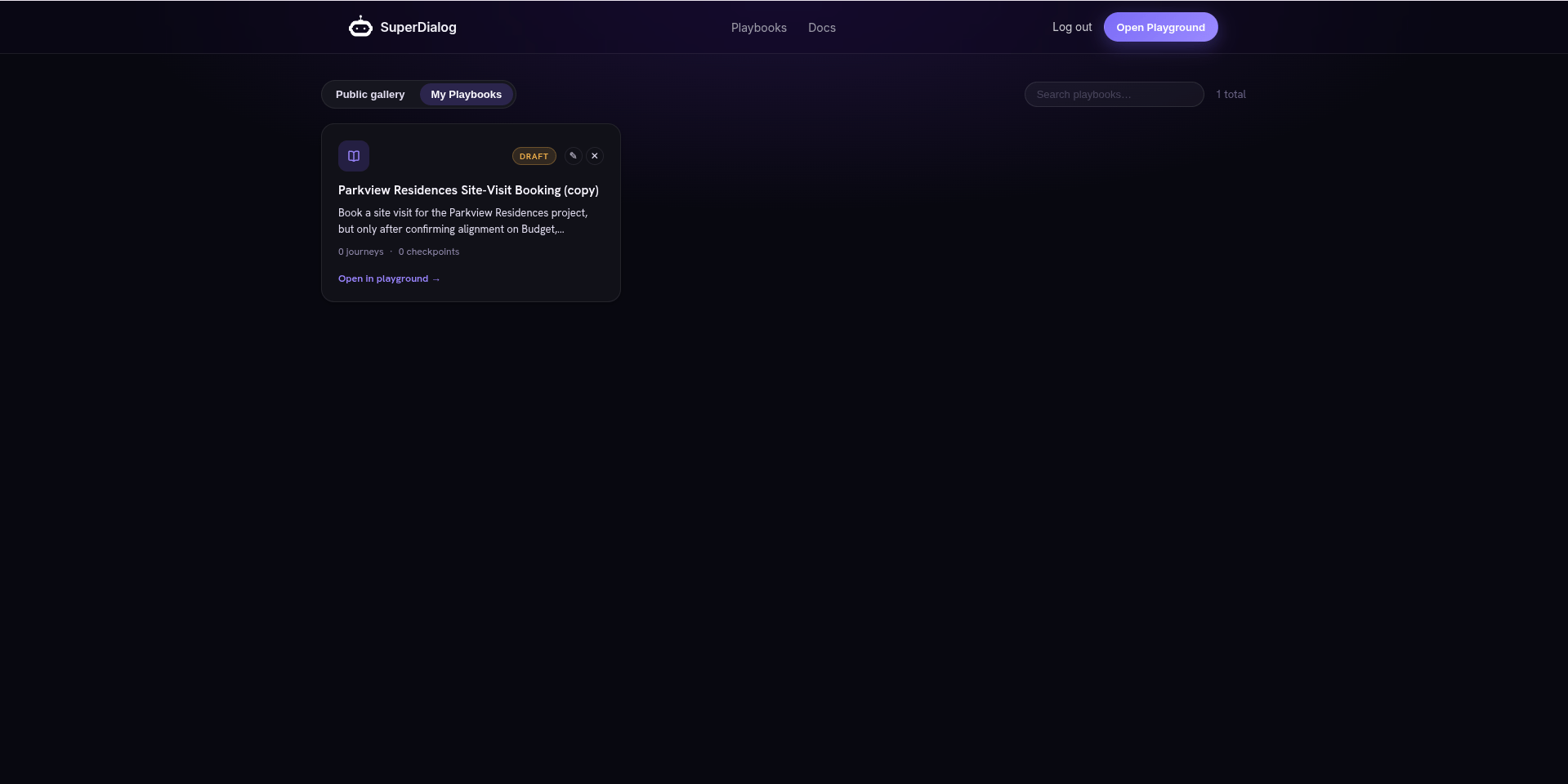 **View in Playground** loads your playbook into the Editor + chat, right where
you left it.
Edit it in chat or by hand, test in Preview, and [publish or
deploy](/playbook/publish-and-share) when it is ready.
Empty tab? *"You don't have any private playbooks yet. Create one in the
Playground."* Head to [Build an agent playbook](/playbook/build-an-agent) to make your
first one.
## Switching playbooks inside the Playground
You do not need to go back to the gallery to change agents. The top of the chat
rail has a **playbook picker**:
* Click it to open the dropdown, **search** by name, and **Select** any playbook
you can access (yours, or a public one, tagged accordingly).
* **New playbook** starts a fresh, blank agent.
* A **history** affordance next to it lists your past **Conversations** (threads)
for the current playbook, so you can reopen or start a **New chat**.
Switching the picker changes which agent the Editor and Preview act on. A test
turn in flight survives the switch, but save your work first so an unsaved buffer
is not left behind.
## Where each one goes next
Reshape it in chat - change persona, checkpoints, and sources.
Press to talk and confirm it still behaves before you ship changes.
Set it Public so it shows in the gallery, or Unlisted for a private link.
Start with why playbooks exist, then what a playbook and the Playground are.
**View in Playground** loads your playbook into the Editor + chat, right where
you left it.
Edit it in chat or by hand, test in Preview, and [publish or
deploy](/playbook/publish-and-share) when it is ready.
Empty tab? *"You don't have any private playbooks yet. Create one in the
Playground."* Head to [Build an agent playbook](/playbook/build-an-agent) to make your
first one.
## Switching playbooks inside the Playground
You do not need to go back to the gallery to change agents. The top of the chat
rail has a **playbook picker**:
* Click it to open the dropdown, **search** by name, and **Select** any playbook
you can access (yours, or a public one, tagged accordingly).
* **New playbook** starts a fresh, blank agent.
* A **history** affordance next to it lists your past **Conversations** (threads)
for the current playbook, so you can reopen or start a **New chat**.
Switching the picker changes which agent the Editor and Preview act on. A test
turn in flight survives the switch, but save your work first so an unsaved buffer
is not left behind.
## Where each one goes next
Reshape it in chat - change persona, checkpoints, and sources.
Press to talk and confirm it still behaves before you ship changes.
Set it Public so it shows in the gallery, or Unlisted for a private link.
Start with why playbooks exist, then what a playbook and the Playground are.